Whatsbot Module – Notification Sound Settings
Overview
The Notification Sound Settings section in the Whatsbot module allows administrators and users to control sound alerts for incoming WhatsApp chats within the system.
This feature helps ensure that support agents and staff are immediately notified when a new message arrives, promoting faster response times and improved communication efficiency.
Proper configuration of notification sounds can enhance productivity, especially in busy support environments where timely replies are essential.
Accessing Whatsbot Notification Sound Settings
1. From the Dashboard, click “Whatsbot” on the sidebar menu.
2. Select “Settings” to open the configuration page.
3. You will find seven (7) sections available in the Whatsbot settings.
4. Click on the “Notification Sound” section to open its configuration options.
Notification Sound Configuration
1. Enable or Disable WhatsApp Chat Notification Sound
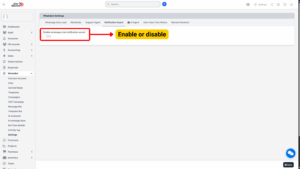
| Field | Details |
|---|---|
| Option | Enable WhatsApp Chat Notification Sound |
| Description | Allows users to enable or disable sound alerts for incoming WhatsApp messages within the Whatsbot interface. When enabled, the system will play a notification sound each time a new message is received, ensuring that agents are alerted even while working in other tabs or sections of the dashboard. |
| Usage | Enable: Turn the toggle ON to activate the WhatsApp chat notification sound. The system will play a sound for every new incoming message — useful for real-time monitoring and ensuring quick responses to customers.
Disable: Turn the toggle OFF to mute all WhatsApp chat notifications. Ideal for quiet environments or when sound alerts may cause distractions. |
Tip
Enabling the notification sound is recommended for active support agents or sales staff who handle large volumes of WhatsApp messages and need to stay responsive.

Saving and Applying Changes
Once the configuration is set:
1. Review your selection (enabled or disabled).
2. Click “Save Changes” or “Update Settings” at the bottom of the page.
3. The system will immediately apply the updated sound preference.
If enabled, users will start hearing the chat notification sound for new messages instantly.
If disabled, Whatsbot will remain silent, displaying only visual chat notifications.