AI Personal Assistant – Whatsbot Module
Overview
The AI Personal Assistant feature in the Whatsbot module enables you to create a smart conversational agent powered by Artificial Intelligence. This assistant interacts naturally with your leads and contacts on WhatsApp, helping automate responses, answer questions, and provide relevant information based on a customized personality and set of instructions.
With configurable settings such as the assistant’s name, role, and behavior, you can design a personalized virtual agent that aligns with your company’s brand identity and communication tone.
Purpose
The AI Personal Assistant is designed to:
– Automate conversations with leads and customers using natural language processing (NLP).
– Provide instant replies to frequently asked questions.
– Enhance customer experience through context-aware and personality-driven responses.
– Reduce manual workload by assisting in lead generation, customer support, and engagement.
Accessing the AI Personal Assistant
1. From the system’s main dashboard, go to the sidebar menu.
2. Navigate to Whatsbot → AI Assistant.
3. You will be redirected to the AI Personal Assistant Management page, where all existing assistants are listed.
From this page, you can:
– Create new assistants,
– Edit existing ones, or
– Delete assistants that are no longer in use.
Creating a New AI Personal Assistant
To create a new AI-powered assistant:
1. Click the “Create AI Personal Assistant” button.
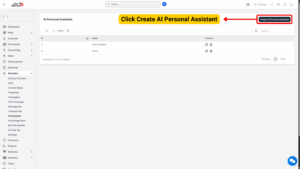
2. The system will open the AI Assistant Configuration Form, where you can define all necessary details.
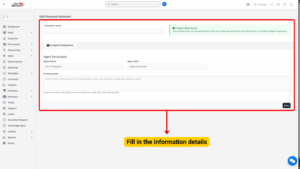
Enter Assistant Name
Assistant Name
Provide a unique and descriptive name for your AI assistant. This helps identify its role and purpose easily.
Note
Use a friendly and relatable name if the assistant will interact directly with customers.

AI Agent Mode Activation
AI Agent Mode Active
When this mode is enabled, the assistant operates using conversational AI, allowing it to understand messages, maintain context, and provide intelligent responses.
If disabled, the assistant will not respond automatically.
Purpose:
Activating this mode ensures that your assistant uses the AI engine to generate dynamic and human-like replies rather than relying on static keyword-based responses.
AI Agent Configuration
This section defines how your AI Assistant behaves and communicates. Proper configuration is crucial to ensure accurate, brand-aligned responses.
1. Agent Personality
The personality settings define how your assistant “speaks” and interacts with users. It includes the following parameters:
(a) Agent Name
Assign a specific name to your virtual agent.
This can be the same as the assistant name or a unique identifier.
(b) Agent Role
Describe the main function or area of responsibility of the AI assistant.
This guides how it frames its responses and tone.
Note
Keep the role concise and clear so the AI can generate context-appropriate responses.
(c) AI Instructions
Provide detailed instructions to shape how your AI assistant behaves, communicates, and handles inquiries. These instructions act as “guidelines” that the AI will follow in every conversation.
Example Instructions:
– Always respond politely and professionally.
– Use short, clear sentences when answering.
– If a question is unclear, ask for clarification.
– Provide relevant information about the company’s services.
– Avoid sharing personal data or making assumptions.
– Always greet the user warmly before answering.
Tip
The clearer your instructions, the more accurate and helpful your assistant’s responses will be.

Save the AI Personal Assistant
After configuring all details:
1. Review your entries.
2. Click Save to store the assistant configuration.
3. Your new AI Personal Assistant will now appear in the AI Assistant List table.